| Recent Comments |
| Categories |
| Archives |
| Tags |
Cubase 16 is out! (Thursday 5 November, 2026)
Two days ago Cubase 16 from Steinberg has been released. The release notes lists all changes. Below I list most of the new features and improvements.
Is this version a major leap forward compared to Cubase 15? No, I wouldn’t say so, but it does introduce quite a few useful additions and improvements that I personally appreciate. Examples include the improved tempo detection and the additional cue sends. Is it worth the money? That’s something I can’t decide for you, as it depends on your budget and how much you value the new features. I always upgrade to the latest version, but that’s a personal choice. One thing to keep in mind: if you skip this upgrade and wait for the next version (Cubase 17, perhaps around 4 November 2027?), you’ll effectively have to pay for two upgrades at once, which will cost roughly twice as much as a single upgrade.
- MIDI
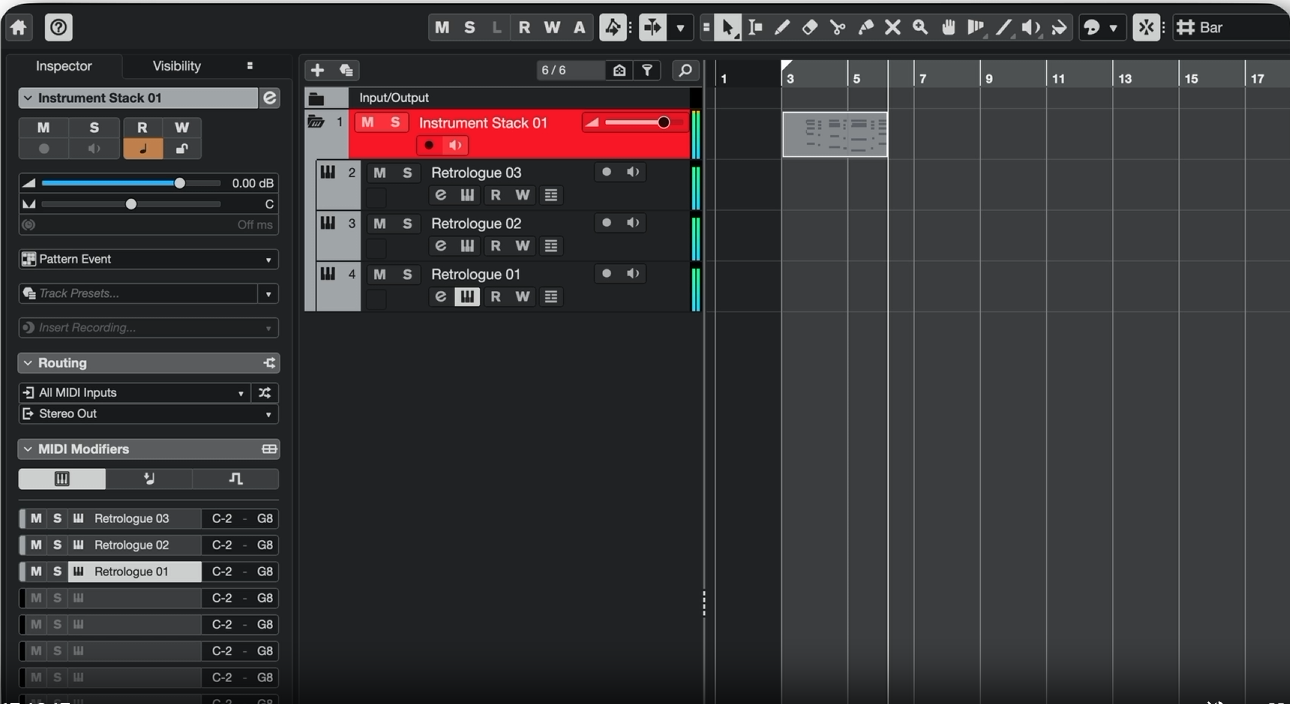
- Instrument Stacks. Combine up to 8 Instrument, Sampler and Drum tracks and control from single MIDI track. Each with specific key range, velocity range, and pitch (in MIDI Modifiers in the Inspector).
- MIDI strum patterns. In inspector in Key Editor. E.g., for guitar parts. It will move the MIDI notes.
- Shape MIDI time (e.g., stretch MIDI). For example, or accelerating or slowing down a MIDI part (move mouse up/down). E.g., for ending of song. Use the Stretch Selection tool in the Key Editor. Try with Snap to Grid on or off.
- Lyrics in Key Editor. Lyrics can now be entered and edited directly alongside MIDI notes in a dedicated Lyrics lane in the Key Editor.
- Give your own name to MIDI CCs. Can be done on a per track basis. Or in MIDI Controller setup. Can be done for the automation lanes
- A MIDI CC (Continuous Controller) is a type of MIDI message used to control parameters of a synthesizer or virtual instrument, such as volume (CC7), expression (CC11), modulation (CC1) or sustain (CC64). Each CC is identified by a number and typically uses values between 0 and 127 to specify the parameter’s setting.
- 8 MIDI Sends (instead of 4). Sends to external hardware or MIDI plugins.
- Create drum maps from Drum Machine.
- MIDI 2.0 support. Support for MIDI 2.0 Note Expression and Expression Maps
- Note On Orchestral Articulations have been added (not yet supported by many instruments). See also [midi.org].
- With compatible MIDI 2.0 devices, MIDI 2.0 software, or VST 3 plug-ins that support the “Note On Orchestral Articulation Profile”, you can embed orchestral articulation data directly into note-on messages. This allows you to define playing techniques precisely by setting the following articulation properties: attribute type, subclass, variation, playing direction, and string number.
- MPE (MIDI Polyphonic Expression) can now be used with Note Expression.
- MIDI 2.0 is an evolution of the original MIDI standard, designed to provide more expressive and detailed communication between electronic musical instruments and software. Unlike MIDI 1.0, which uses 7-bit values for most control parameters (128 possible values), MIDI 2.0 supports higher-resolution data, allowing much finer control over parameters such as velocity, pitch and expression. It also introduces per-note control, meaning that individual notes within a chord can have their own expression, pitch and other parameters. Furthermore, MIDI 2.0 supports bidirectional communication, allowing instruments and software to automatically exchange information about their capabilities and settings. Importantly, MIDI 2.0 is designed to remain backward-compatible with MIDI 1.0, facilitating a gradual transition to the new standard.
- Note On Orchestral Articulations have been added (not yet supported by many instruments). See also [midi.org].
- Windows MIDI Services. Cubase 16 introduces support for Windows MIDI Services on compatible Windows 11 systems. This provides access to the latest Windows MIDI infrastructure.
- This is Microsoft’s new MIDI infrastructure for Windows 11 (version 25H2 or later). It replaces and modernizes parts of the older Windows MIDI system that applications such as Cubase use to communicate with MIDI keyboards, controllers, synthesizers and virtual MIDI ports.
- The important point is that it is not a new MIDI protocol or a new type of MIDI device. It is the underlying Windows system that manages MIDI communication.
- It prepares (home) studios for MIDI 2.0 and next-generation devices on Windows 11
- There are several potential benefits:
- Multi-client MIDI: Multiple applications can access the same MIDI device simultaneously. For example, Cubase and a synthesizer librarian can communicate with my Yamaha MODX M8 at the same time, without competing for exclusive access.
- MIDI 2.0 support: It provides the infrastructure for MIDI 2.0, including higher-resolution control data and more expressive communication with compatible devices.
- Improved timing: The new infrastructure is designed to reduce MIDI latency and jitter, resulting in more consistent timing.
- Better virtual MIDI routing: It supports virtual MIDI connections and loopback functionality, making it easier for applications to exchange MIDI data.
- Improved device management: Better plug-and-play support and automatic reconnection of disconnected devices.
- AUDIO
- Advanced separation (I did not check if this is the same as SpectraLayers Pro which I also have).
- Redesigned tempo detection.
- Previous the track would be set to 1/4 time signature, the warp mode was enabled, and you had to figure out where the downbeat was and align that to the grid [see tempo detection]
- It now has largely been streamlined, and finds the down beat and time signature and places the audio on the grid. ‘
- Muscial Mode’ has been renamed to ‘Follow’.
- In settings we have now ‘Enable Follow Tempo’ to have imported audio files automatically follow the tempo.
- New spectral audio warp modes. Can be used for sound design. Suitable for (extreme) pitch shifting and time stretching. [manual]. Was developed by the HALion team.
- Pitch detection and phase reversal in the Sampler Track & Drum Machine.
- You can do pitch detection in the sampler track/Drum Machine, and assign that to the root key.
- TRACKS
- Up to 16 sends (instead of 8) per track.
- 8 Cue sends (instead of 4) in Control Room. Finally!
- OTHER
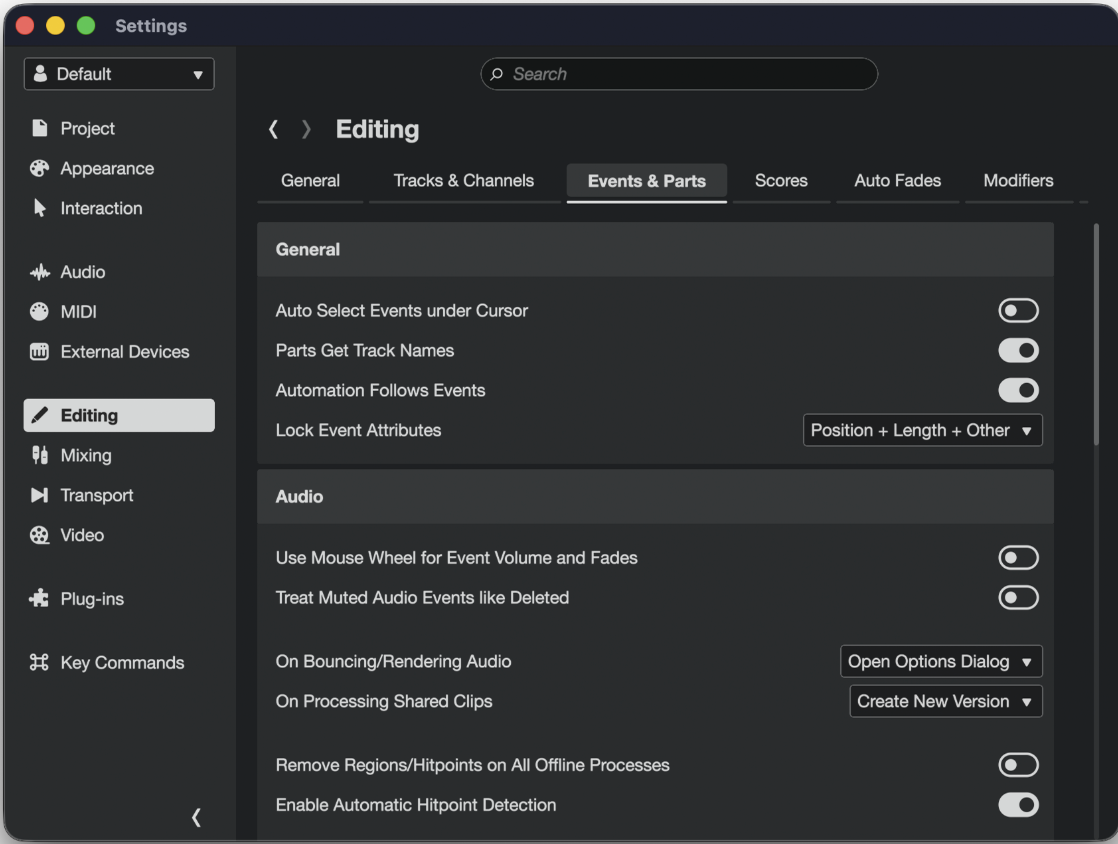
- Redesigned settings. The 16 previous setup windows are now in one global searchable place. Any change in the settings window is automatically applied.
- Preferences
- Key commands
- Assign key commands with right-click
- Appearance / Colors. We can now have multiple Color Sets!
- Studio Setup
- Audio Connections
- Plugin Management
- Profile manager (upper left-hand corner)
- Workspace Organizer
- Metronome setup
- Synchronization
- etc
- Redesigned audio pool.
- MPEG-4 Audio Import. Cubase now supports importing M4A, M4B, and M4R audio files encoded with AAC-LC, HE-AAC, or HE-AAC v2.
- MPEG-4 is a multimedia standard that defines how audio and video data are stored and organised. Files using the MPEG-4 container commonly have the extensionsM4A, M4B or M4R, depending on their intended use. M4A is typically used for music and other audio files, M4B is commonly used for audiobooks and can support features such as chapters and bookmarking, while M4R is primarily used for iPhone ringtones. Although these extensions indicate different purposes, they are all based on the same underlying MPEG-4 container format.
- The audio stored inside these containers is compressed using an audio codec, most commonly AAC (Advanced Audio Coding). AAC comes in several profiles. AAC-LC (Low Complexity) is the standard profile, offering good audio quality and broad compatibility. HE-AAC (High-Efficiency AAC) uses an additional technique called Spectral Band Replication (SBR) to achieve better audio quality at lower bitrates. HE-AAC v2 extends this further by adding Parametric Stereo (PS), which improves coding efficiency for stereo audio, particularly at very low bitrates.
- Folder visibility. The expanded and collapsed states of folders can now be synchronized between the Track List and MixConsols.
- External instruments and Effects. Easier to setup. Settings are together in settings.
- Extended ASIO Guard. Has now 5 instead of 3 levels increasing the processing buffer.
- Ableton Link support. Easier sync with other compatible music app.
- Ableton Link synchronizes tempo, beats, and transport between connected applications, allowing musicians and producers to work together without complicated synchronization setups. This is particularly useful for electronic music production, live performance, and collaborative workflows involving multiple applications or devices.
- You can link Cubase on your PC and Cubasis on your phone/iPad.
- Video display on multiple outputs. Additional formats and (variable) frame rates are now handled.
- New FX Mastering presets. Developed by Sappo Mastering. See [YouTube].
- Load ‘FX Chain Preset’ and search for ‘PRO’.
- “Add VST-Plugin Picture” is now in the menu of the VSTi and there is not separate ‘camera icon’ anymore.
- Quick help.
- Redesigned settings. The 16 previous setup windows are now in one global searchable place. Any change in the settings window is automatically applied.
- PLUGINS
- Drum chain.
- Vocal touch.
- Plugin randomization. Available in each plugin to randomize its parameters (eg for sound design).
- Remove bypassed and inactive plugins. In the MixConsole. It will leave alone the Inserts for which there is automation that enables the bypass of the Insert.
- Add insert plugins with shortcut. Plugin is inserted in first available Insert slot. Assign short cut to ‘Add Insert Effect to Selected Channel’. I have assigned Ctrl-Shift-Num+
- If you do this in the MixConsole with Q-Link enabled, then the plugin is inserted on all selected tracks.
- Extended drag and drop. Move or copy all Insert effects to other track. Or, drag Insert to empty space in track area, and it will automatically create and connect and FX track with that plugin. Also works for the Channel Strip and Modulators.
- VSTi INSTRUMENTS
- Module (FM sounds for HALion).
- Omnivocal Basic. Has been improved. I still don’t like it, or do I?. Listen to [YouTube]. Lyrics can now be added via the Lyrics Lane. You can also copy-paste in lyrics. Lyrics also end up in the Score editor. There is also an Omnivocal Pro that also includes vocal stacking.
- LOOPSETS
- In mediabay.
- Afro House, Beats & Breaks, K-Pop, Latin Vibes, Organic Sessions
What is (still) missing?
- No MediaBay improvements.
- Adding a track still adds this track to every MixConsole configuration.
- No improvements on expression maps/ advanced MIDI articulation management.
- No further integration of Dorico (score editor)
- An other suggestion that I came across, but would need to check in my VEP configuration, is to allow Instrument Tracks to route to VEP tracks.
- Thank god, no AI stuff……although not everyone agrees and looking at other DAWs there might actually be some gain:
- March 2025 — The Ableton community releases a working MCP (Model Context Protocol) server for Live, allowing Claude AI to directly control Ableton: create tracks, set tempo, trigger clips, adjust routing — all through natural language. Built by the community, not Ableton itself. The fact that the community beat the company to this is itself a statement.
- April 2026 — Avid announces a formal partnership with Google Cloud to bring agentic AI directly into Pro Tools. Not a chatbot. Not a tooltip. An AI that operates the DAW on your behalf.
- October 2026 — Apple ships Logic Pro 13 with a full AI assistant that can analyze your session, generate chord progressions from audio, and directly execute commands inside the DAW. Free for all subscribers. Ships complete on day one.
- November 4, 2026 — Steinberg ships Cubase 16 with… Quick Help: an AI-powered contextual assistant that, per the official release notes, is “being introduced gradually” because “not all areas of Cubase are covered yet.”
- Note that the Model Context Protocol (MCP) is an open standard, introduced by Anthropic, that allows AI applications to connect to external tools, software and data sources through a common interface. It enables an AI assistant to interact with a DAW (Digital Audio Workstation) and access its functionality, rather than merely providing advice based on text descriptions. For example, an AI assistant could use MCP to inspect tracks, adjust mixer settings, manage plugins, or automate repetitive tasks directly within the DAW, provided the DAW exposes these functions through an MCP server. See also [here],
- CPR project file inspector. Dom Sigalas has released a very good looking inspector (Mac only for now which is a shame).
- Possibility to improve Visual Ergonomics & UI Color Scheme.
- Deeper CPU multi-core optimization. See for example [here].
- VCA bug. The long-standing VCA fader bug involves audio tracks and channels “forgetting” their relative positions, mixing levels, or losing proper automation scaling after closing and restarting a project [see here and here].
- Connection of multiple audio interfaces.
- Modulators are still buggy.
Walkthrough videos
See several walkthroughs of changes and new features in Cubase 13 the videos below:
References