| Recent Comments |
| Categories |
| Archives |
| Tags |
Investigating High DPC Latency Caused by tcpip.sys
Introduction
After building a high-end Windows 11 workstation for Cubase, Dorico, Vienna Ensemble Pro (VEP) and Bome Network, I noticed occasional audio clicks and pops despite having a powerful computer and conservative ASIO buffer settings. These audio artifacts are typically caused by the operating system failing to deliver audio data before the playback deadline. A common cause is excessive kernel execution latency, i.e., the delay between the occurrence of an event (such as a hardware interrupt) and the moment the Windows kernel begins processing it.
Running LatencyMon consistently showed that tcpip.sys (Microsoft TCP/IP Driver) was responsible for very large Deferred Procedure Call (DPC) execution times. Because Bome Network uses UDP port 37000, it was initially suspected that Bome Network was responsible for the excessive latency but it turned out to be my virus scanner (Bitdefender Total Security).
This post describes the complete investigation, the experiments that were performed, and the conclusions. Although in the end the solution to reduce latency was simple (uninstalling bitdefender) and has been reported before, this debugging processed helped me to understand a little bit better what is causing audio drop outs and that this is not merely a matter of buying a faster computer.
This post describes the complete investigation, the experiments that were performed, and the conclusions that were drawn. Although the eventual solution for reducing the latency was surprisingly simple (i.e., uninstalling Bitdefender) and has been reported by others before, the debugging process taught me a great deal about the underlying causes of audio dropouts. It showed that reliable real-time audio performance is not simply a matter of buying a faster computer, but of understanding how the operating system, device drivers, and hardware interact under strict timing constraints.
Background
Why real-time performance matters in a Digital Audio Workstation
Unlike office applications, web browsers or video players, a Digital Audio Workstation (DAW) is a real-time system. During recording and playback, audio samples must be delivered to the audio interface at precisely defined intervals. If the operating system fails to supply the next block of audio data before the current buffer has been consumed, the audio interface has no valid samples available. The result is an audible click, pop or dropout.
Modern processors are extremely fast, and it is therefore tempting to assume that CPU utilization is the primary determinant of DAW performance. In practice, this is often not the case. A workstation may exhibit excellent benchmark performance and still suffer from occasional audio interruptions because one kernel driver temporarily prevents the audio subsystem from executing.
Consequently, the worst-case latency of kernel execution is often far more important than average CPU utilization. Latency is the delay between the moment an event occurs and the moment the operating system begins processing that event. The kernel is the central part of the operating system that manages communication between software and hardware, including interrupt handling, device drivers, memory management, and CPU scheduling. In Windows, networking components such as tcpip.sys, the Windows Filtering Platform (WFP), and network adapter drivers execute within the kernel. If any of these components occupy the CPU for an extended period, other time-critical kernel activities, such as scheduling the audio engine, must wait. Consequently, even systems with very low average CPU utilization can experience audio dropouts when kernel latency temporarily exceeds the available audio buffer time.
Audio buffers and latency
Professional audio interfaces communicate with the DAW through an ASIO (Audio Stream Input/Output) driver. Rather than processing one audio sample at a time, audio is transferred in blocks, commonly referred to as buffers.
For example, when using
- 48 kHz sampling frequency
- 128 sample buffer
the audio engine must deliver a new buffer every
![\[ \frac{128}{48000}=2.67 \text{ms} \]](https://skippystudio.nl/wp-content/ql-cache/quicklatex.com-439b18924b42c11a858035f798e1cfec_l3.png "Rendered by QuickLaTeX.com")
Likewise,
| Buffer | Time available |
|---|---|
| 64 samples | 1.33 ms |
| 128 samples | 2.67 ms |
| 256 samples | 5.33 ms |
| 512 samples | 10.67 ms |
These values represent the maximum amount of time available for all audio processing, including:
- VST instruments
- VST effects
- disk streaming
- automation
- mixer calculations
- kernel scheduling
- driver execution
If another driver occupies the processor longer than the available buffer time, the audio callback cannot complete before the deadline, causing an buffer underrun. It is therefore possible for a computer with only 10% CPU utilization to still experience audio dropouts.
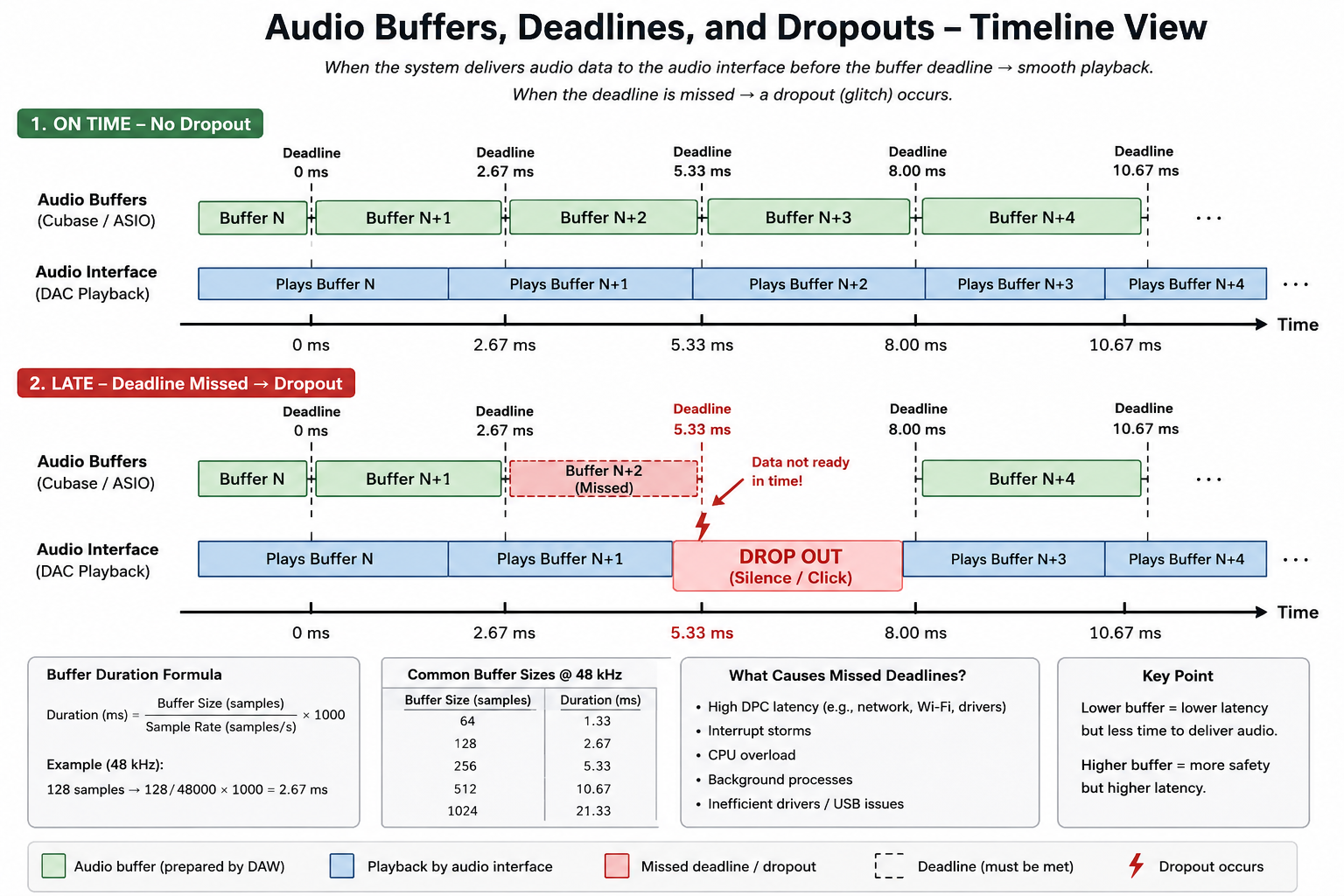
Figure. Relationship between audio buffers, deadlines, and dropouts.
Interrupts, ISRs and Deferred Procedure Calls
Hardware devices continuously request processor attention. Examples include
- network adapters
- USB controllers
- NVMe SSDs
- graphics cards
- audio interfaces
When a hardware device (including the audio interface) raises an interrupt, the processor temporarily suspends the currently executing code (unless a higher-priority interrupt is already being serviced) and transfers control to the corresponding Interrupt Service Routine (ISR). The ISR performs only the minimum work required to acknowledge the interrupt and typically schedules a Deferred Procedure Call (DPC) to complete the remaining processing. This distinction is important because it is generally long-running DPCs, not ISRs themselves, that are responsible for the elevated DPC latencies reported by tools such as LatencyMon. Also important to note that the interrupt raised by the audio interface does not necessarily has the highest priority. Priorities are determined by the interrupt controller (APIC or x2APIC), the interrupt vector assigned by Plug-and-Play, Windows’ interrupt management, and the hardware platform.
The processing pipeline therefore becomes
Hardware interrupt –> Interrupt Service Routine (ISR) –> Deferred Procedure Call (DPC) –> Normal thread execution
DPCs execute at a high interrupt request level (IRQL). While a DPC is executing, ordinary application threads, including the Cubase audio engine, cannot run. Consequently, a single excessively long DPC may delay the ASIO callback sufficiently to produce an audible glitch.
Why average CPU utilization is misleading
Windows Task Manager primarily reports average CPU utilization. For real-time audio, average utilization is often irrelevant. Consider the following example. Suppose a network driver occupies one CPU core for 10 milliseconds every five seconds. The average processor utilization contributed by this driver is almost negligible:
![\[ \frac{10}{5000}=0.2% \]](https://skippystudio.nl/wp-content/ql-cache/quicklatex.com-aa5f74683ef10ecaac9c96d1e7800c9f_l3.png "Rendered by QuickLaTeX.com")
Nevertheless, if the ASIO buffer requires servicing every 2.7 ms, that single 10 ms interruption is sufficient to generate multiple audio dropouts. This explains why users often report clicks and pops despite processor utilisation remaining below 20%.
Measuring DPC latency
One of the most widely used diagnostic tools for Windows real-time systems is LatencyMon.
LatencyMon measures, among other quantities,
- ISR execution times
- DPC execution times
- page faults
- driver execution statistics
- interrupt latency
The software reports the drivers responsible for the longest observed execution times. Although invaluable, the reported driver should not automatically be interpreted as the root cause. A driver may merely be the location where expensive work becomes visible. This distinction is one of the central themes of the present investigation.
Windows networking architecture
Understanding the networking subsystem is important because the largest execution times during this investigation consistently occurred inside tcpip.sys. The simplified networking stack is shown below.
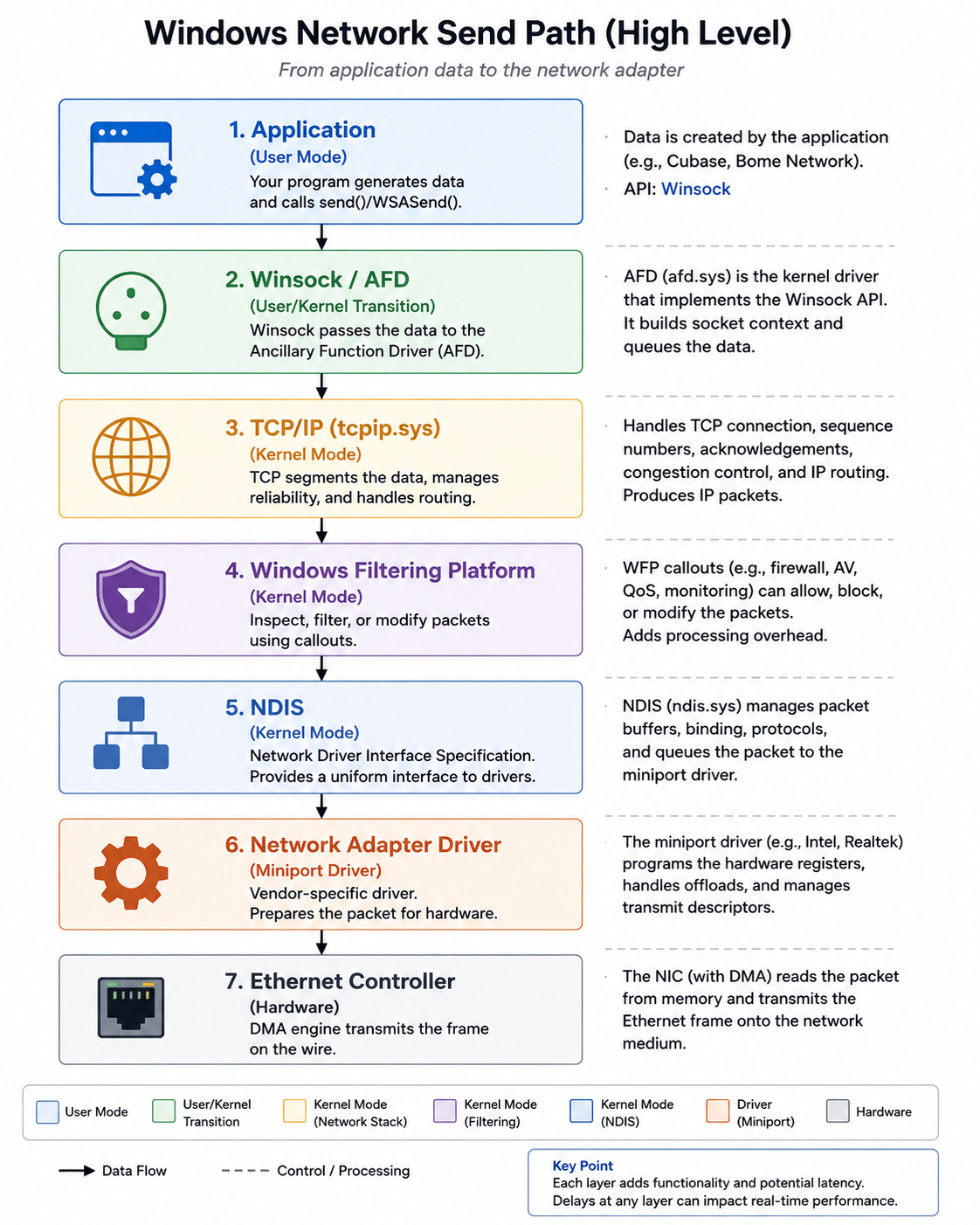
Figure. Simplified Windows 11 networking stack.
Applications such as web browsers, cloud synchronization software and network-aware MIDI applications (e.g., Bome Network) communicate through Winsock. Data subsequently traverses the Microsoft TCP/IP implementation (tcpip.sys), the Windows Filtering Platform (WFP), the Network Driver Interface Specification (NDIS), and finally the network adapter driver before reaching the physical Ethernet controller.
Each layer may contribute processing overhead. Importantly, third-party security software can insert additional kernel filters into this path. Kernel filters in Windows 11 are low-level system drivers (minifilters) and networking components that intercept, monitor, or modify operations before reaching the OS. They are widely used for antivirus scanning, encryption tools, and packet filtering, though they can also cause system instability or crashes.
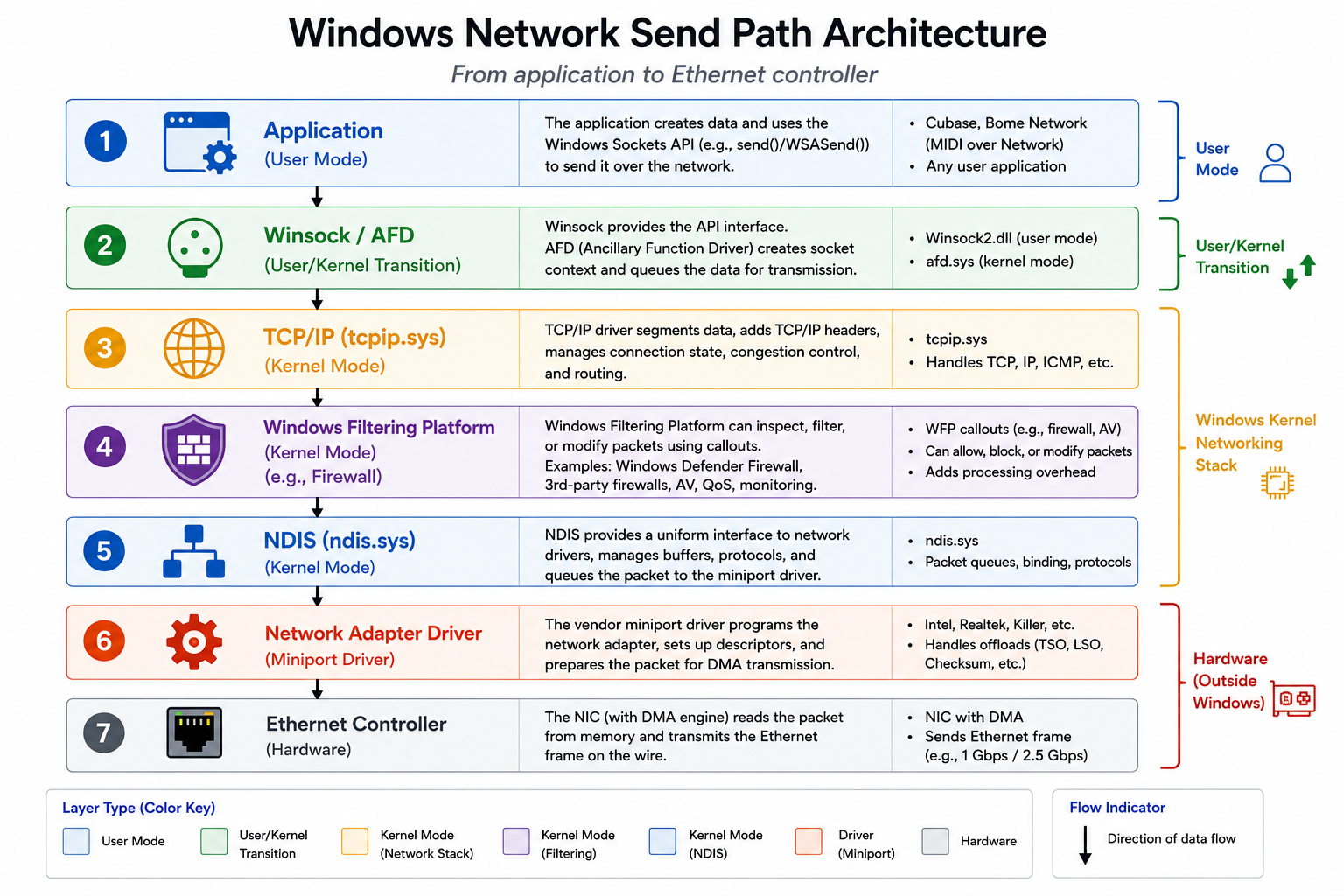
Figure. Windows network send path architecture. Data generated by an application is transmitted through several layers of the Windows networking stack before reaching the network interface controller (NIC). The data first passes through the Winsock API and Ancillary Function Driver (AFD), after which it is processed by the TCP/IP driver (tcpip.sys). The Windows Filtering Platform (WFP) provides a framework for packet inspection and filtering by components such as Bitdefender or Windows Defender Firewall and third-party security software, potentially introducing additional processing overhead. Packets are subsequently forwarded through the Network Driver Interface Specification (NDIS) to the vendor-specific network adapter (miniport) driver, which programs the Ethernet controller for transmission. Delays introduced at any layer, particularly within the kernel networking stack or packet filtering components, can increase Deferred Procedure Call (DPC) latency and negatively affect real-time audio performance.
Windows Filtering Platform (WFP)
The Windows Filtering Platform provides a framework that allows kernel drivers to inspect, modify or block network traffic. Security products use WFP to implement
- firewalls
- intrusion detection
- malware inspection
- packet filtering
- traffic monitoring
Consequently, network packets may pass through multiple software layers before reaching the hardware. Although WFP is highly efficient, poorly optimized filter drivers may increase DPC execution time. For most desktop applications this overhead is insignificant. For real-time audio, however, even occasional delays of several milliseconds may exceed the available ASIO processing time.
Why `tcpip.sys` may not be the real culprit
LatencyMon repeatedly reported tcpip.sys as the driver with the highest DPC execution time. At first sight this suggests a defect in Microsoft’s TCP/IP implementation.
However, this interpretation is often incorrect. The TCP/IP driver acts as a central component through which network traffic flows. When another kernel component delays processing, such as a packet inspection driver, the resulting execution time may be attributed to tcpip.sys, even though the underlying cause lies elsewhere. For this reason, the present investigation focuses on controlled experimentation rather than relying solely on LatencyMon output.
System configuration
The workstation consists of:
- Windows 11
- Intel Ethernet Controller (3) I225-V (driver 2.1.5.7)
- NVIDIA Studio Driver
- MSI motherboard
- Cubase Pro
- Dorico
- Vienna Ensemble Pro
- Bome Network 1.6.0
- Bitdefender Total Security
- etc
Initial LatencyMon results consistently showed:
- tcpip.sys execution spikes between approximately 8 and 12 ms
- Audio drop-out warnings
- Excellent ISR timings
- Very few hard page faults
This suggested that the problem originated in the networking subsystem rather than the audio interface.
Initial hypotheses
Several possible causes were considered:
1. Bome Network continuously transmitting UDP packets.
2. Intel I225-V driver problem.
3. Windows TCP/IP stack.
4. Windows Filtering Platform (WFP).
5. Bitdefender network filtering (e.g., the Bitdefender TAP adapter)
The goal was to isolate each variable using controlled experiments.
Preliminary investigation
The following observations were made:
- Auto-discovery in Bome Network was disabled (because I use Bome network on a single computer; see also [here]); I left this disabled.
- Only a single UDP socket on port 37000 was open.
- NetBIOS was disabled (this was initially enabled on my computer, but I disabled it)
- When disabling IPv6 there as no measurable improvement.
- Various Intel adapter performance options (Interrupt Moderation, Energy Efficient Ethernet, Large Send Offload, etc.) were disabled with little effect. I left these disabled.
- Latest Intel driver was already installed.
These changes did not remove the tcpip.sys spikes.
Controlled experiments
Test A – Baseline
Configuration
- Ethernet enabled
- Bitdefender installed and enabled
- Bome Network running
Result: Highest tcpip.sys execution: 8.85 ms
Observation: Large DPC spikes remained.
Test B – Bome stopped
Configuration
- Ethernet enabled
- Bitdefender installed and enabled
- Bome Network stopped
Result: Highest tcpip.sys execution: 12.24 ms
Interpretation: Stopping Bome did not improve latency.
Conclusion: Bome Network is not the source of the latency spikes.
Test C – Ethernet disabled
Configuration
- Ethernet adapter disabled
- Bitdefender installed and enabled
- Bome Network running
Result: Highest tcpip.sys execution: 1.33 ms
Interpretation: Disabling the Ethernet adapter reduced the worst-case DPC latency by approximately 85%. This clearly demonstrated that the networking subsystem was involved.
Test D – Ethernet cable unplugged
Configuration
- Ethernet adapter enabled
- Network cable unplugged
- Bitdefender installed and enabled
- Bome Network running
Result: Highest tcpip.sys execution: 8.84 ms
Interpretation: This was one of the most important experiments. Despite having essentially no network traffic, tcpip.sys still produced very large DPC spikes. This demonstrated that the problem was not caused by packet traffic. Instead, merely having an active network adapter was sufficient to trigger the latency.
Final experiment – Uninstalling Bitdefender
Configuration
- Bitdefender completely removed.
- Ethernet enabled
- Bome Network running
Result: Highest tcpip.sys execution: 0.257 ms. This represents roughly a 34-fold reduction compared to the original measurements. The dominant driver also changed from tcpip.sys to the NVIDIA graphics driver, whose latency remained within a perfectly reasonable range for a professional DAW.
Interpretation
The experiments allow several hypotheses to be rejected.
Bome Network
Initially Bome Network appeared suspicious because it listens on UDP port 37000.
However:
- stopping Bome had no effect;
- unplugging the network cable had no effect;
- disabling the Ethernet adapter did improve latency.
Therefore Bome Network itself is very unlikely to be responsible.
Intel I225-V
The Intel driver also appears unlikely to be the primary cause. LatencyMon never identified the Intel miniport driver or NDIS as problematic. Instead, the expensive execution always occurred inside tcpip.sys.
Bitdefender
Removing Bitdefender almost completely eliminated the tcpip.sys spikes.
This strongly suggested an interaction between:
- Intel I225-V
- Windows TCP/IP
- Windows Filtering Platform
- Bitdefender kernel filtering drivers
rather than a defect in Cubase, Bome Network or the Intel driver itself.
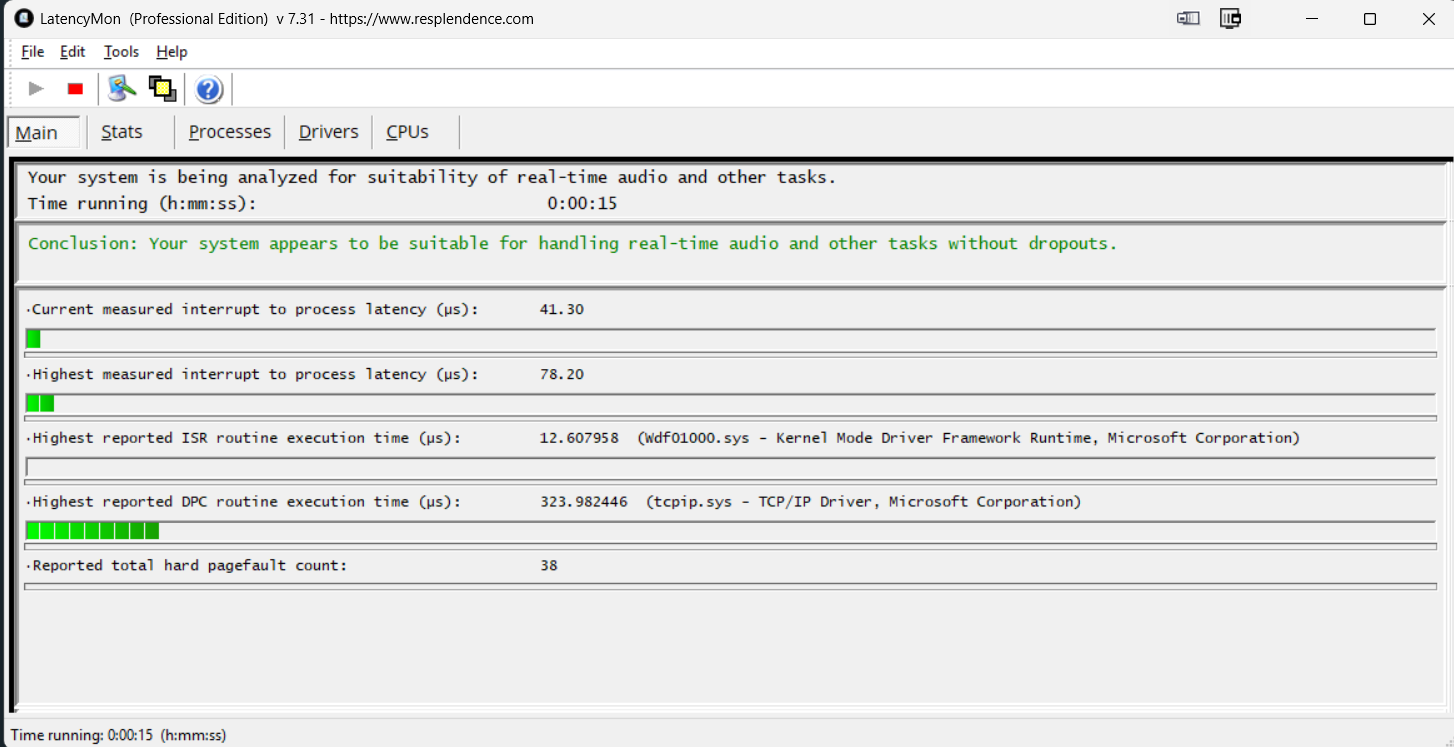
Figure. My current Latencymon readings
Conclusions
The investigation leads to the following conclusions.
- Cubase was not responsible.
- Bome Network was not responsible.
- Network traffic itself was not responsible.
- Simply enabling the network adapter activated the problematic execution path.
- Removing Bitdefender reduced tcpip.sys latency from approximately 9–12 ms to only 0.26 ms.
For this workstation, the primary source of excessive DPC latency was the interaction between Bitdefender and the Windows networking stack. However, it remains unclear why the audio problems appeared so suddenly, given that I had been using Bitdefender for years without any noticeable issues. The onset of the problems roughly coincided with the addition of several virtual MIDI ports in Bome Network, initially suggesting that this change might have been responsible. However, the experiments described in this post indicate that Bome Network was unlikely to be the cause. Furthermore, the same audio dropouts occurred while mixing audio in Cubase without using MIDI or Bome Network, further weakening that hypothesis. It is therefore more likely that another change, such as a Windows update, a Bitdefender update, or a network driver update, altered the behavior of the networking stack. Unfortunately, because these changes were not investigated at the time the problem first appeared, the exact trigger will probably never be identified.
Recommendations
For professional DAW systems I recommend:
- Use Microsoft Defender unless specific Bitdefender functionality is required.
- Use LatencyMon to verify system behavior after installing security software.
- Avoid assuming that the driver with the highest execution time is necessarily the driver that contains the root cause.
- Perform controlled A/B experiments by changing only one variable at a time.
Final remarks
This investigation illustrates how misleading DPC latency analysis can be. Although LatencyMon consistently reported tcpip.sys as the offending driver, the root cause was not the Microsoft TCP/IP driver itself. Instead, systematic experimentation demonstrated that the excessive latency originated from an interaction with third-party kernel filtering software.